TunesBank, the leading brand providing powerful video downloaders for years, now released its brand product TunesBank Amazon Video Downloader with powerful functionality to download Amazon Prime Video content offline on PC and Mac.
(PRUnderground) March 31st, 2026
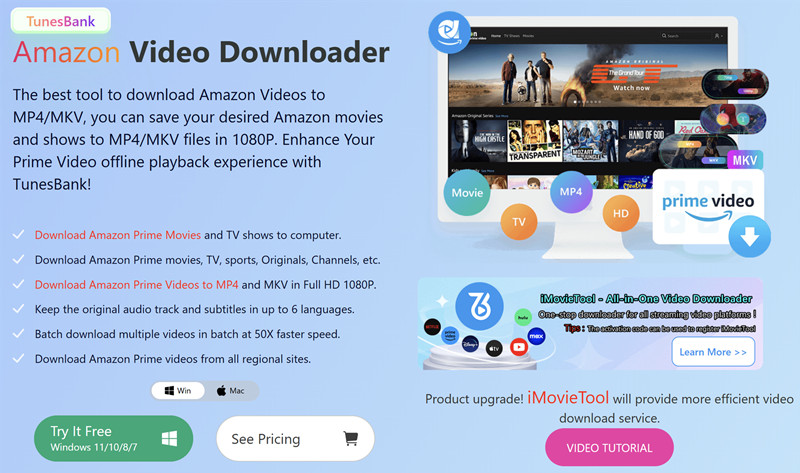
TunesBank, a well known provider of multimedia download solutions, has officially launched its powerful Amazon Video Downloader to help users to save Amazon Prime content on computer at ease, so that enhancing Amazon Prime Videos offline viewing experience. Here’s everything you need to know about TunesBank Amazon Video Downloader, including top features, system requirements, prices, and a simple guide on how to use it.
As streaming platforms continue to grow, many users find it inconvenient that downloaded videos cannot be played freely across different devices or kept permanently. To solve these problems, TunesBank introduces a smarter and more efficient solution that gives users full control over their downloaded content. Since its release, TunesBank Amazon Video Downloader has quickly gained attention for its stable performance and user friendly design.
Overall Introduction of TunesBank Amazon Video Downloader
TunesBank Amazon Video Downloader is a simple tool that helps users to download movies and TV shows from Amazon Prime Video for offline viewing, this program supports to download Amazon Video to MP4 and MKV, you can download Amazon Prim Video to Windows and Mac computer, so that making Amazon videos easily playback offline on all devices anytime.
After downloading Amazon Video to Mac or Windows PC(laptop), the tool will save video downloads with high video quality, up to Full HD 1080P, you also can choose audio tracks and subtitles in different languages before downloading. With fast download speed and batch downloading, you can download multiple videos or even full seasons quickly. Overall, it offers an easy and flexible way to enjoy Amazon videos offline without limitations.
It also supports downloading both streaming videos and purchased or rented content from Amazon. Whether you are watching videos through a subscription or have bought or rented them, you can easily download and save them for offline viewing anytime.
Key Features of TunesBank Amazon Video Downloader
TunesBank Amazon Video Downloader offers a range of powerful features to improve Amazon Video offline viewing experience.
1# Play Amazon Videos Without Playback Limits
Unlike the official download feature, TunesBank Amazon Video Downloader removes playback limits during download. You can save videos as local files, so that you can transfer and play Amazon Video on any devices without the Amazon app, and keep them for flexible offline viewing.
2# Convert Amazon Videos to MP4 or MKV
The software allows users to download Amazon videos in widely supported formats like MP4 and MKV. This makes it easy to play the videos on different devices such as smartphones, tablets, smart TVs, and game consoles without compatibility issues.
3# High Quality Video Output – Up to 1080p
TunesBank ensures that all videos are downloaded in high quality, including up to Full HD 1080P resolution. It also keeps the original audio tracks, giving users a cinema like experience at home.
4# Multiple Audio Tracks and Subtitles
The downloader detects available audio tracks and subtitles automatically. Users can choose different languages based on their needs. It also supports various subtitle options, including embedded subtitles, external subtitle files, and hardcoded subtitles.
5# 50X Fast Speed and Batch Downloading
With built in acceleration technology, TunesBank Amazon Video Downloader offers fast download speeds up to 50X. Users can download multiple videos at the same time, including entire seasons of TV shows, which helps save time and effort.
How to Use TunesBank Amazon Video Downloader
TunesBank Amazon Video Downloader is designed with a simple interface, making it easy for beginners to use. Follow the steps below to get started:
Step 1. Download and install TunesBank Amazon Video Downloader on your computer. Launch the program and log in to your Amazon account.
Step 2. Use the search bar to find the movie or TV show you want to download. You can also paste the video link directly.
Step 3. Click the settings icon to choose output format, video quality, audio language, and subtitle preferences.
Step 4. Select the videos and click the Download button to start the process.
Step 5. Once downloading finished, you can find your downloaded videos on computer and paly them offline anytime.
System Requirements
Before using TunesBank Amazon Video Downloader, please check the system requirements below:
Windows OS
System: Windows 11 10 8.1 8 7
CPU: Intel Core i3 or above
RAM: 4GB or more
Free Space: At least 20GB
Mac OS
System: Mac OS X 10.11 or later
CPU: Core 2 Duo or higher
RAM: 4GB or more
Free Space: At least 20GB
Pricing Plans
TunesBank Amazon Video Downloader offers both a free trial and full version. The trial version allows users to test the features with limited usage.
1 Year Plan: US$59.95
Lifetime Plan: US$89.95
Users can upgrade to the full version to unlock unlimited downloads and full length videos.
About TunesBank
TunesBank is dedicated to developing reliable tools for downloading and managing streaming content. Its products support various platforms including Amazon Prime Video, Netflix, Disney Plus, and more. TunesBank continues to improve its technology to provide users with a better offline viewing experience.
Contact Information:
Official Website: https://www.tunesbank.com/
Email: support@tunesbank.com
Visit TunesBank on social media:
Facebook: https://www.facebook.com/TunesBank.official
Twitter: https://twitter.com/TunesBank
TikTok: https://www.tiktok.com/@tunesbank
The post TunesBank Amazon Video Downloader Released to Boost Amazon Videos Offline Viewing Experience first appeared on
Original Press Release.