Photo from Unsplash
Originally Posted On: https://www.splashtop.com/how-to-remote-access-quickbooks
Tax season is already stressful enough, with accountants working an average of 50 to 70+ hours per week, but it’s even worse when you factor in travel time. There’s nothing more draining than having a mountain of work to get through and wasting precious hours driving to your clients’ offices. Many firms have adapted to a more virtual environment to decrease travel time and reduce the tax season workload. However, you need the right software to do so.
Imagine having access to all of your clients’ QuickBooks and important documents via your computer, tablet, or even smartphone. Now imagine being able to do that anywhere in the world at any time. Thousands of tax preparers and accountants have turned to remote access software to do just that.
With Splashtop, you can remotely access QuickBooks (and important documents) on any of your clients’ computers in seconds.
The Benefits of Remote Accessing QuickBooks
Remote access software, enables you to reduce the number of hours you work each week, eliminate stress, and still get all of your work done. On top of that you can:
- Access your clients’ computers outside of regular work hours
- Use a mobile device in addition to a computer to access QuickBooks remotely
- Stay productive—even when you’re on the go
- Cut down on travel time
- Work from the comfort of your own home
Accounting professionals need a reliable, secure tool that offers flexibility and accessibility. Remote access tools aren’t created equally, though—especially when it comes to accessing QuickBooks Desktop remotely—so choose wisely.
Splashtop Business Access ticks all the boxes, making it the best tool for tax pros who need secure access to client documents.
How to Remote Access QuickBooks
Once you get started with Splashtop Business Access, you’ll have unlimited remote access to your clients’ Windows and Mac computers, from any of your Windows, Mac, iOS, Android, or Chromebook devices. You’ll be able to access your client’s QuickBooks in seconds.
Here are 4 easy steps to get you started:
- Open the Splashtop Business app on your device.
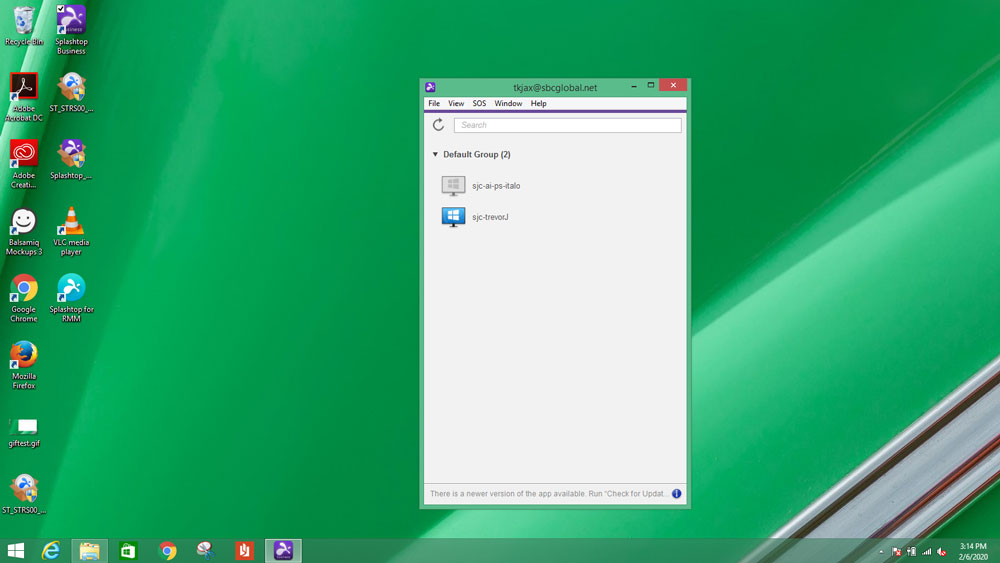
- Look through your list of computers until you find the one you want to access.
- Click to start the remote session – then the remote computer screen will open on your device. You will now be able to remote control the computer in real time.
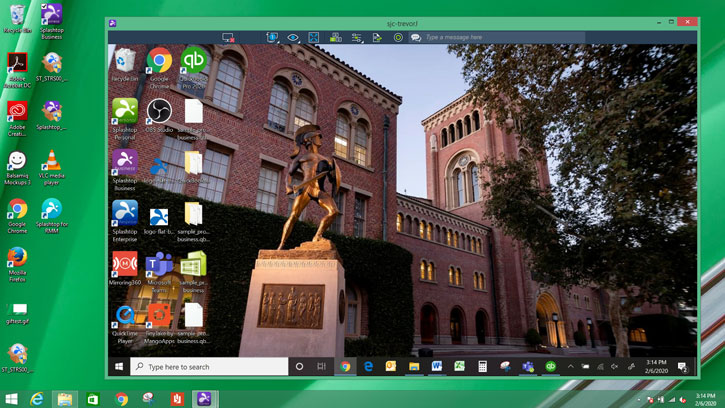
- Open QuickBooks on the remote computer.
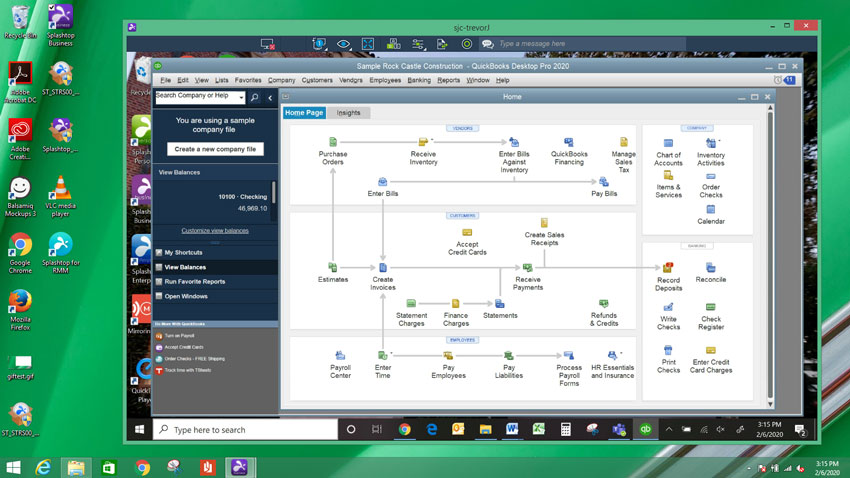
That’s it! You can literally connect in seconds from ANY of your devices at any time, and from anywhere in the world. That includes remote access to QuickBooks from your iPhone, iPad, or Android device.
What You Can Do While Remote Accessing QuickBooks
Once remoted into QuickBooks, you can complete regular tasks with ease.
- Control QuickBooks and other apps as if you were sitting in front of your client’s computer
- Remotely print checks, receipts, 1099 forms, and other documents from the your client’s computer to your local printer
- Transfer important files from your clients’ computers to yours so you can save important information locally
- Train your clients—they’ll see your screen and as you talk them through how to use certain apps, best practices, etc. in real time
On top of that, Splashtop remote access offers you and your clients robust security. Between encrypted connections, device authentication, two-step verification and more, you can securely access your clients’ computers.
Stay productive and save time with Splashtop’s remote access software for tax preparers and accountants.